
Image is backbone of any artilce, If you are trying to figure out which image format will make Google fall in love with your website, you have probably run into a wall of technical jargon.
You will hear people screaming about WebP, others swearing by old-school JPEGs, and a few tech-heads whispering about AVIF.
The honest truth?
There is no single “magic” format that acts as an SEO cheat code. Instead, search engines care about speed, clarity, and context.
The best image for SEO is the one that delivers the highest visual quality at the absolute lowest file size, tailored to what the image actually contains.
Let’s break down how this works in the real world.
The Contenders: Format vs. Function
To win at image SEO, you need to match your image content to the right file format. Using the wrong one is the fastest way to bloat your page size and tank your loading speeds.
| Format | Best Used For | SEO Strength | Weakness |
| WebP | Everyday website images, blog photos, landscapes | Excellent (Google’s favorite; 25-35% smaller than JPEG) | Older browser compatibility (rare nowadays) |
| AVIF | High-detail hero images, complex graphics | Outstanding (Even smaller than WebP with incredible quality) | Takes more server power to compress |
| JPEG | Photograph fallbacks | Good (Universal compatibility) | Larger file sizes when uncompressed |
| PNG | Logos, screenshots, graphics with transparent backgrounds | Fair (Crisp lines, supports transparency) | Massive file sizes for complex photos |
| SVG | Icons, simple vector graphics, logos | Perfect (Infinite scalability, tiny file size) | Cannot be used for real photographs |
The New Kings of SEO: Next-Gen Formats (WebP & AVIF)
If you run your website through Google PageSpeed Insights, you have likely seen a warning that says: “Serve images in next-gen formats.” Google is explicitly telling you what it wants.
Next-gen formats like WebP and AVIF are superior because they use advanced compression algorithms to shrink file sizes dramatically without making your images look pixelated or blurry.
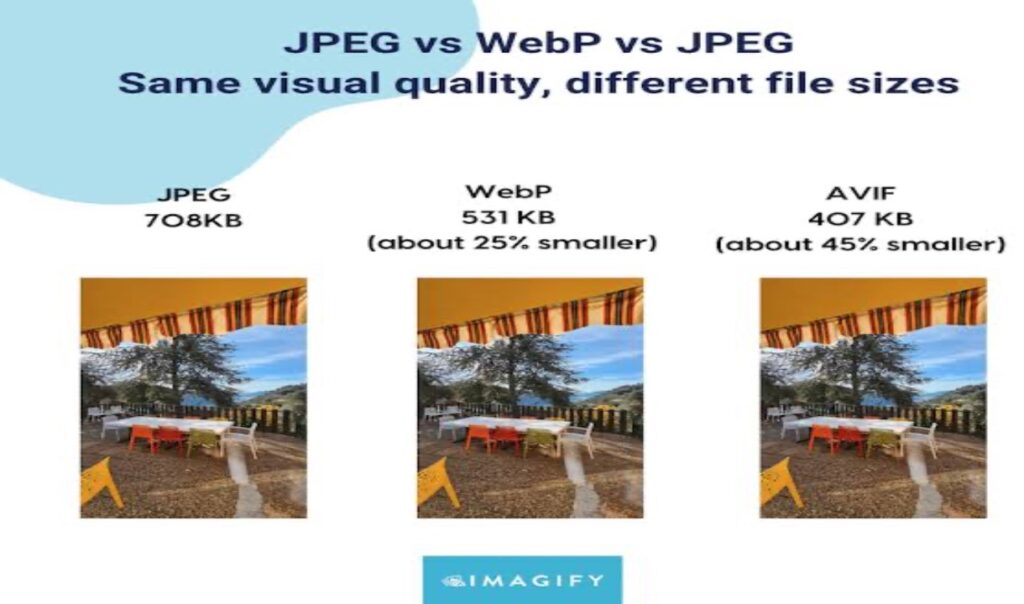
As you can see in the comparison above, you can maintain the exact same visual clarity while shaving off massive amounts of data. AVIF cuts the file size nearly in half compared to a standard JPEG. For an SEO strategy, fewer kilobytes means faster load times, better Core Web Vitals scores, and happier visitors.
Beyond the Format: What Actually Makes an Image “Best” for SEO?
Choosing WebP or AVIF is only half the battle. If you upload a beautifully compressed 5MB WebP image that is 4000 pixels wide, you are still hurting your SEO.
To maximize your search visibility, your images must check three major boxes:
1. Dimension Matching (Don’t Oversize)
If your blog content area is only 800 pixels wide, do not upload a 2400-pixel-wide image. Your user’s browser will have to download the giant file and then shrink it down to fit the screen. Scale your images to the exact maximum size they will actually display on your site before uploading them.
2. Contextual File Names
Google’s spiders cannot “look” at a photo the way humans do; they read the text attached to it.
- Bad: DCIM_0042.webp
- Good: best-running-shoes-for-flat-feet.webp
Use descriptive, hyphen-separated keywords that tell search engines exactly what the image represents.
3. Alt Text That Solves For Accessibility
Alt text (alternative text) exists primarily for screen readers used by visually impaired visitors. Because it helps humans, Google rewards it heavily. Write naturally. Don’t just stuff keywords.
Example: Instead of alt=”shoes running footwear sale”, write alt=”A pair of blue cushioned running shoes resting on a track”
The final thoughts
If you want the absolute best setup for modern SEO, use WebP as your primary default workhorse for blog posts and standard web images, and SVG for your logos and icons. If you have a highly visual site (like a photography portfolio or design agency) and want to stay ahead of the curve, make the jump to AVIF.
Most modern website builders and WordPress plugins (like Smush, Imagify, or ShortPixel) can automatically convert your standard uploads into these next-gen formats on the fly—saving you the hassle of manual conversion while keeping your site lightning-fast.
To get your photos ready for the web without any hassle, you can use a fast, browser-based image resizer to adjust your dimensions and instantly convert files into lightweight, next-gen formats like WebP. It lets you handle all your compression and scaling directly in your browser without losing visual quality, making it incredibly easy to hit those perfect Core Web Vitals scores.